Stereo VU, not just a combined meter
I added a new option to Instruments that turns the classic VU Meter into a real dual-VU display. Instead of blending both channels into one reading, it now shows left and right separately so you can actually watch stereo balance the way it should be shown.
Where to find it
You can enable it from View > Instruments. Once Stereo VU is active, the meter splits into two independent needles, one for each channel. It is a small UI change, but it makes the Instruments area feel much more alive and a lot more useful when you are checking channel behavior on real music.
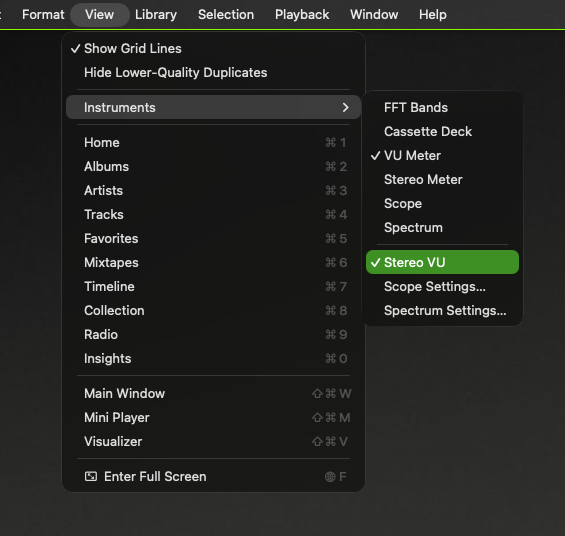
You can also see the new toggle right inside the View menu, under Instruments, which keeps the feature discoverable without adding clutter to the main interface. For me, that is the sweet spot - a visible feature, but still tucked away where power users expect it.
Once active, its the new default for VU
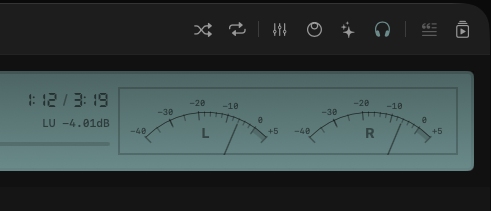
The screenshot above shows the result: two clear meters labeled L and R, each moving on its own. That is exactly what I wanted here - less abstraction, more actual information. This was one of those requests that kept showing up in Reddit comments, so I finally made time for it this weekend, and honestly, it was worth it.
Built for the main window
One detail worth calling out: Stereo VU does not appear in the Mini Player. That is intentional. The Mini Player is all about staying compact, and this kind of instrument needs a little more room to breathe.
Why I like this one
From a dev standpoint, this is one of those changes that feels immediately rewarding. It is straightforward, it improves the UI, and it gives a better visual read on stereo material without changing the playback engine at all. Just a cleaner way to look at the signal and a better tool for people who care about detail.