Headphone Correction With AutoEQ
This is one of those features that immediately makes sense once you see it in action. Zenteek Player can now correct supported headphones using the AutoEQ database, with more than 6000 measurements from over 20 sources. The idea is simple: I select my headphone, choose a target curve, save it, and the player handles the rest.
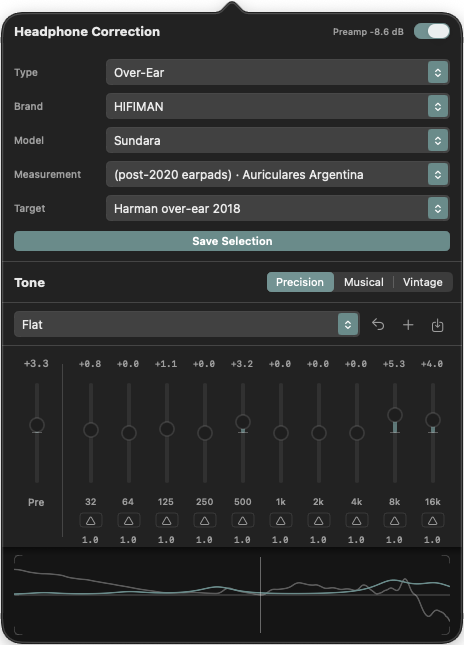
Fast Setup, No Guesswork
The selection flow keeps things intentionally short. I go through a few basic options like type, brand, model, measurement, and target curve. Once the profile is saved, it gets out of the way. From then on, I can just activate it when I want to listen. That is exactly how this kind of feature should work - useful, precise, and not demanding attention every time I open the app.
Built On Real Measurements
AutoEQ is not a vague tone trick. It compares a specific headphone model against a reference target and calculates the EQ correction needed to bring it closer to that curve. In practice, that means I can aim for a flat monitoring profile or use the popular Harman target as a fast starting point. For collectors with multiple headphones, that is a very practical way to get consistency across a library of different sound signatures.
Precision EQ, Musical, And Vintage
The 32-band EQ is still the core of the system, but I also wanted the visual feedback to stay consistent across the different equalizer modes. The drawn curve below the Precision EQ is now also visible in Musical and Vintage, so I can always see what the profile is doing instead of switching modes and losing context.
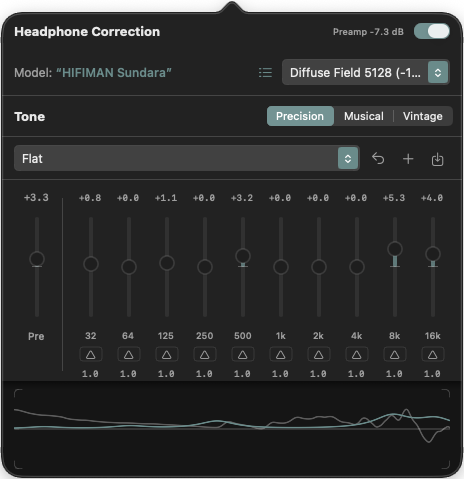
Why This Matters
For me, this is not about making every headphone sound identical. It is about giving the player a technically grounded correction path for people who know what gear they own and care about how it measures. If I want a clean baseline, I can get one. If I want a specific target, I can choose that too. And if I just want to listen, the profile is already ready.