Tone Shaping, Now Easier To Trust
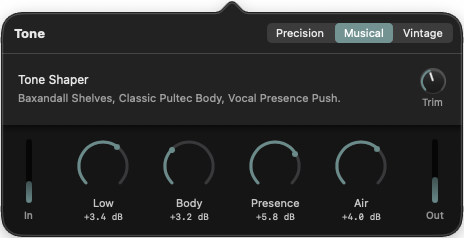
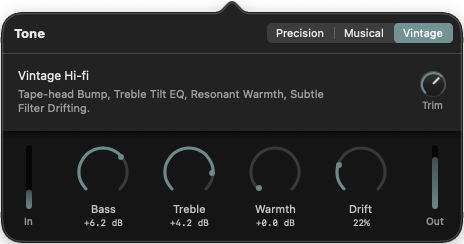
The Musical and Vintage Tone Shaping Equalizers now include real-time input and output signal meters, plus a Trim Gain control in the top-right corner of each panel. That means I can see exactly what is happening before and after the EQ, and I can pull the level back when frequency boosts start getting a little too enthusiastic.
Why This Matters
Tone shaping is fun until a nice boost turns into unwanted clipping (red lining). With the new metering, I can check the signal path at a glance instead of relying on guesswork or volume knobs that are doing too much emotional labor. The Trim control makes it easy to compensate for added gain directly inside the effect, which keeps the output cleaner and the workflow faster.
Musical And Vintage Each Got The Same Upgrade
Both Tone modes now behave more like proper tools and less like black boxes:
- real-time input meter on the left
- real-time output meter on the right
- Trim Gain control for quick level correction
- safer frequency boosts with less risk of clipping
Musical stays focused on broad, pleasing tone changes like Baxandall-style shelves, classic body, and vocal presence push. Vintage leans into tape-head bump, treble tilt EQ, resonant warmth, and subtle drift. In both cases, the new metering makes it much easier to push the sound where I want it without accidentally pushing the output into ugly territory.
A Small UI Change That Saves Time
This is one of those updates that looks modest on paper but makes the whole feature feel more complete in daily use. I wanted the user to have immediate feedback right where the sound is being shaped, not buried in another panel or hidden behind extra steps. Now the controls and the meters live together, which makes the whole adjustment loop much tighter.
If I boost low end, I can see the result. If the output gets hot, I can trim it immediately. That is the kind of small, practical change that keeps the tone shaping workflow fast, clear, and a lot more reliable.