Multiroom audio sounds simple until you actually try to do it right. Most solutions hand off playback to the remote device and hope for the best. Track transitions stutter. Gapless playback breaks. Crossfades disappear entirely. Synchronization drifts.
Zenteek 1.4.0 takes a different approach.
Output Routing streams audio in parallel to AirPlay 2 and DLNA/UPnP receivers - remote devices receive one continuous, finished signal, including everything Zenteek adds to the signal. They're endpoints, not players that you load a track into. It is a broadcast. Think of it as your own personal radio station. Not just track distribution.
Routing means you get a mixer with per-device delay compensation and gain control let you tune synchronization manually. "Local output mute" lets you silence your desk while the living room keeps playing. The continuous transport bus means crossfades and gapless transitions work across every connected device, not just the one in front of you.
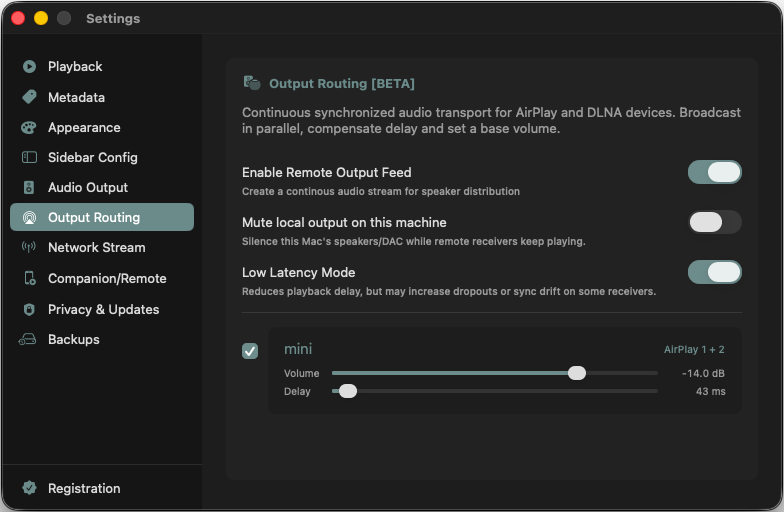
The only downside to this - and i want to be transparent on that - is that you will not be able to control the stream from the speaker/receiver. It also may not show the current track. However, that caveat is offset by Zenteek's built-in remote control interface that you can run on any browser. Zenteek tries to talk to any device, input or output, but actually is prepared to act as an audio system for your home.
What's next
This is the first version. One group, all your devices. After the Beta - once connectivity is proven across most hardware people actually own - this architecture gets a lot more interesting as it already designed for multiple groups.
DLNA implementations vary wildly across manufacturers, and I can only test against so many devices. Also AirPlay often has a mind of its own. I will try to support it as good as possible so if you run into an issue use the support form in the Help menu to write me. I'll look into it.